Agentic AI
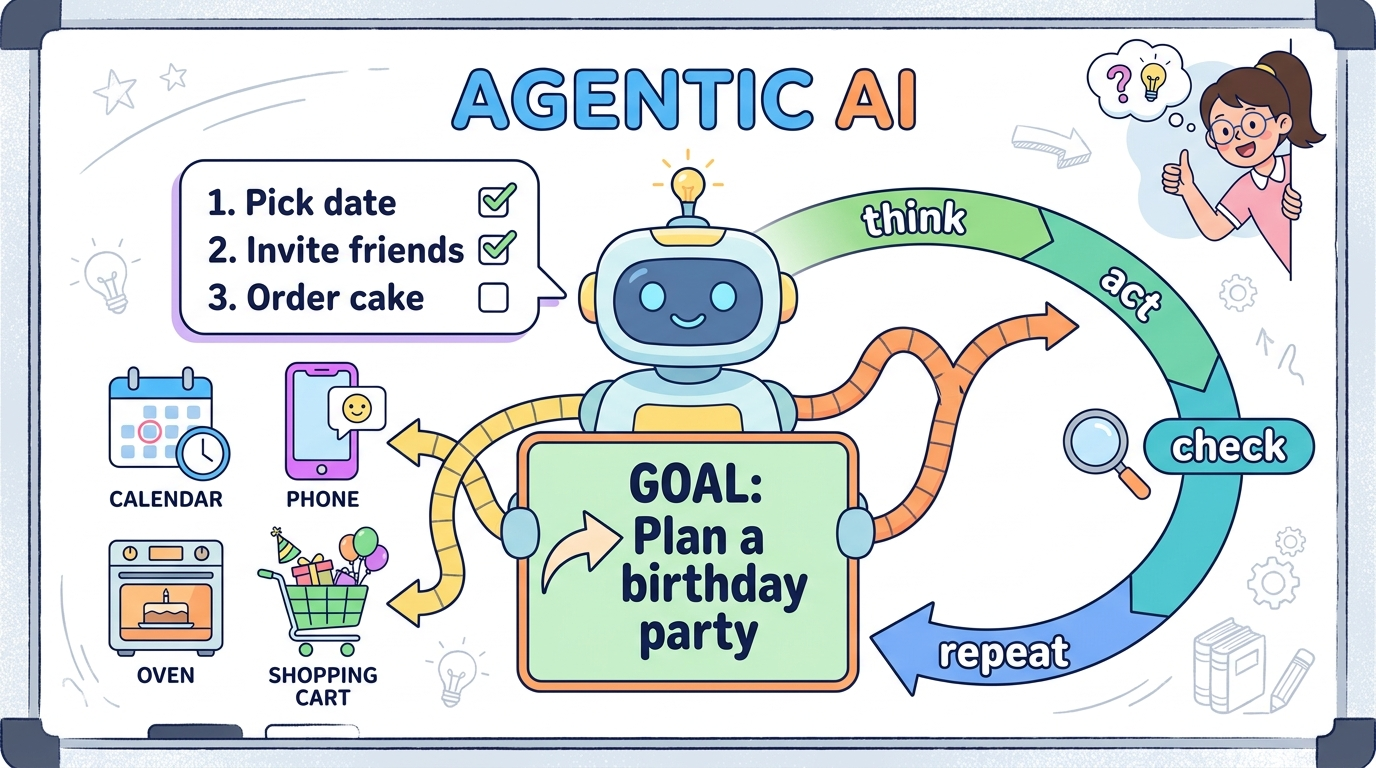
The one-sentence version: a normal AI answers — an agentic AI gets things done. You give it a goal, and it figures out the steps, uses tools, checks its own work, and keeps going until the goal is met.
The analogy — a vending machine vs. an intern
A regular chatbot is a vending machine: put in a question, a snack pops out. One shot, done. An agentic AI is a new intern: say “Plan the office party,” and they make a to-do list, book the room, order pizza, text everyone, and come back when it's finished.
The loop that makes it "agentic"
The key idea: agents need tools to actually do things in the real world. That's exactly where APIs and MCP come in. 👇
API Calls
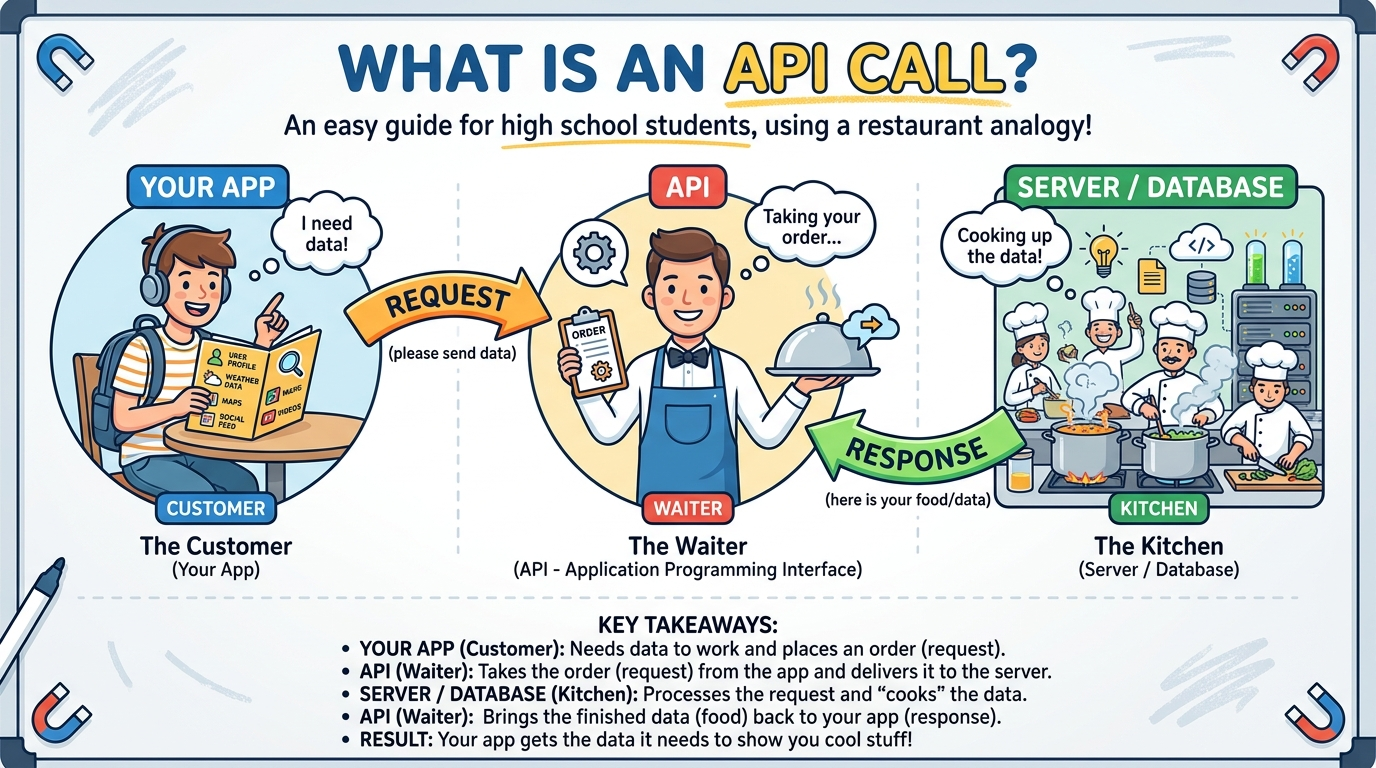
Theory: an API (Application Programming Interface) is a messenger that lets two pieces of software talk using agreed-upon rules. An API call is one round-trip: you send a request, you get back a response.
The analogy — a waiter at a restaurant
You (your app) are the customer. The kitchen is a giant server you can't walk into. The API is the waiter: you give your order (the request); the waiter brings your food (the response). You never need to know how the kitchen cooks — just how to order.
A real example — weather
Your weather app doesn't own a satellite. It makes an API call:
REQUEST:   GET weather for Austin, TX

RESPONSE:  { "temp": 98, "sky": "sunny", "humidity": 40 }
The reply comes back as tidy data (usually JSON, like above). Every refresh is another API call. You already use them constantly: “Log in with Google,” a live game leaderboard, or Google Maps inside Uber — all API calls.
Both Sides of an API Call
Let's follow one real request from start to finish — what your side sends, how the other end finds what you asked for, and how the answer travels back. This is a live example: the data below was fetched from a real weather server.
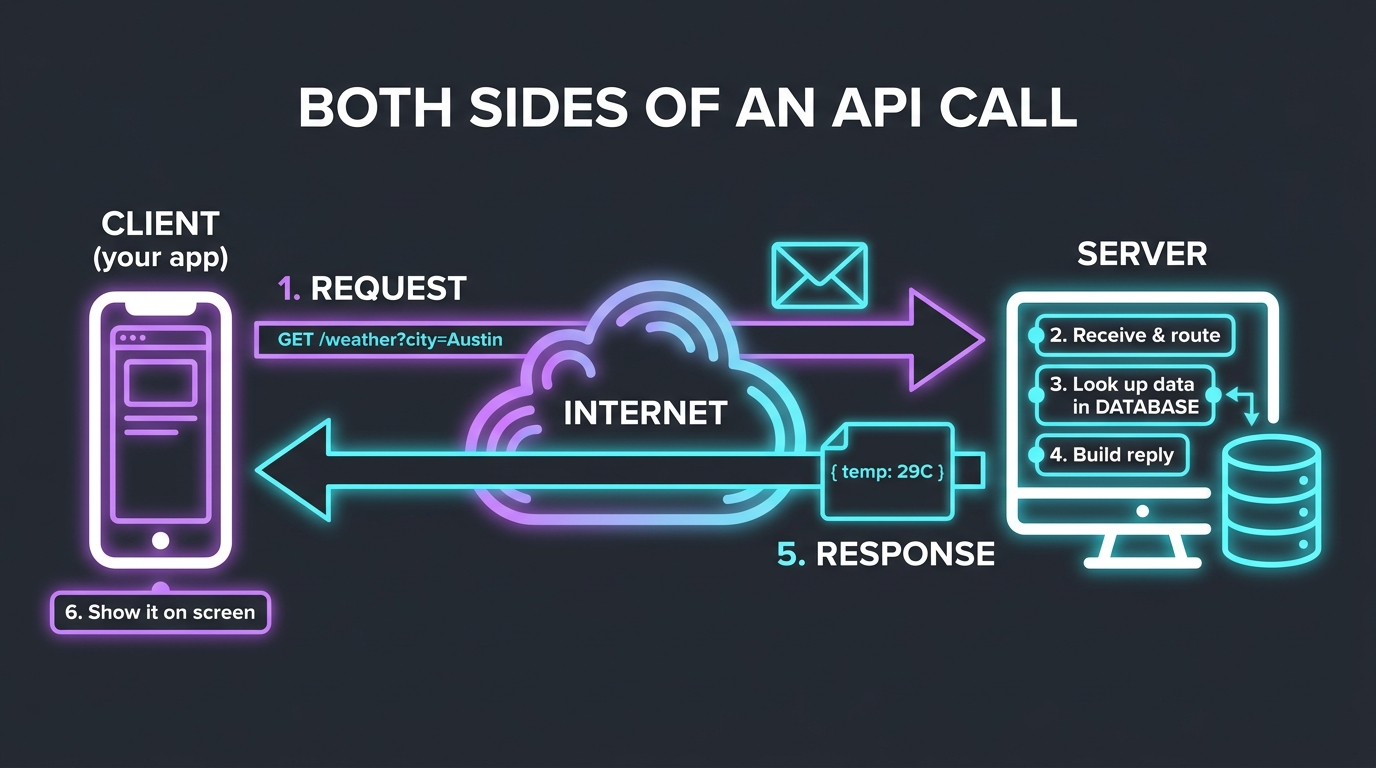
Our real example: "What's the weather in Austin right now?"
We'll call a free public weather API (Open-Meteo). Austin sits at latitude 30.27, longitude -97.74 — so we ask for exactly that spot.
Send the request
Your app writes a tiny message and mails it to the server's address (api.open-meteo.com). The question is baked right into the URL — the part after ? holds the inputs (which coordinates, what data).
GET /v1/forecast?latitude=30.27&longitude=-97.74¤t=temperature_2m,relative_humidity_2m,wind_speed_10m HTTP/1.1
Host: api.open-meteo.com
User-Agent: curl/8.13.0
Accept: */*☝️ Real request. GET = "please give me data." The Host is who to deliver it to. Those inputs after the ? are how the server knows exactly what you need.
Receive & route it
The server reads the address on the envelope (/v1/forecast) and hands it to the right piece of code — like a mailroom sorting a letter to the correct department.
Get what it needs
This is the "how does it get what it needs" part. The server takes your inputs (Austin's coordinates) and looks up the answer — reading from its weather database / models. It never shows you this messy work; it just fetches the numbers.
Build the reply
It packages the numbers into a neat, agreed-upon format — JSON — and stamps it with a status code (200 OK = success), then sends it back.
HTTP/1.1 200 OK
Content-Type: application/json

{
  "latitude": 30.27, "longitude": -97.75,
  "current": {
    "time": "2026-07-08T05:00",
    "temperature_2m": 28.6,
    "relative_humidity_2m": 64,
    "wind_speed_10m": 12.3
  },
  "current_units": { "temperature_2m": "°C", "wind_speed_10m": "km/h" }
}
☝️ The actual response from the live server. Austin was 28.6 °C, 64% humidity, 12.3 km/h wind at that moment.
Response arrives & gets used
Your app receives the JSON, plucks out temperature_2m, and paints it on screen: "Austin: 29°C ☀️". The user never sees any of the machinery — just the answer.
https://api.open-meteo.com/v1/forecast?latitude=30.27&longitude=-97.74¤t=temperature_2mMCP — Model Context Protocol
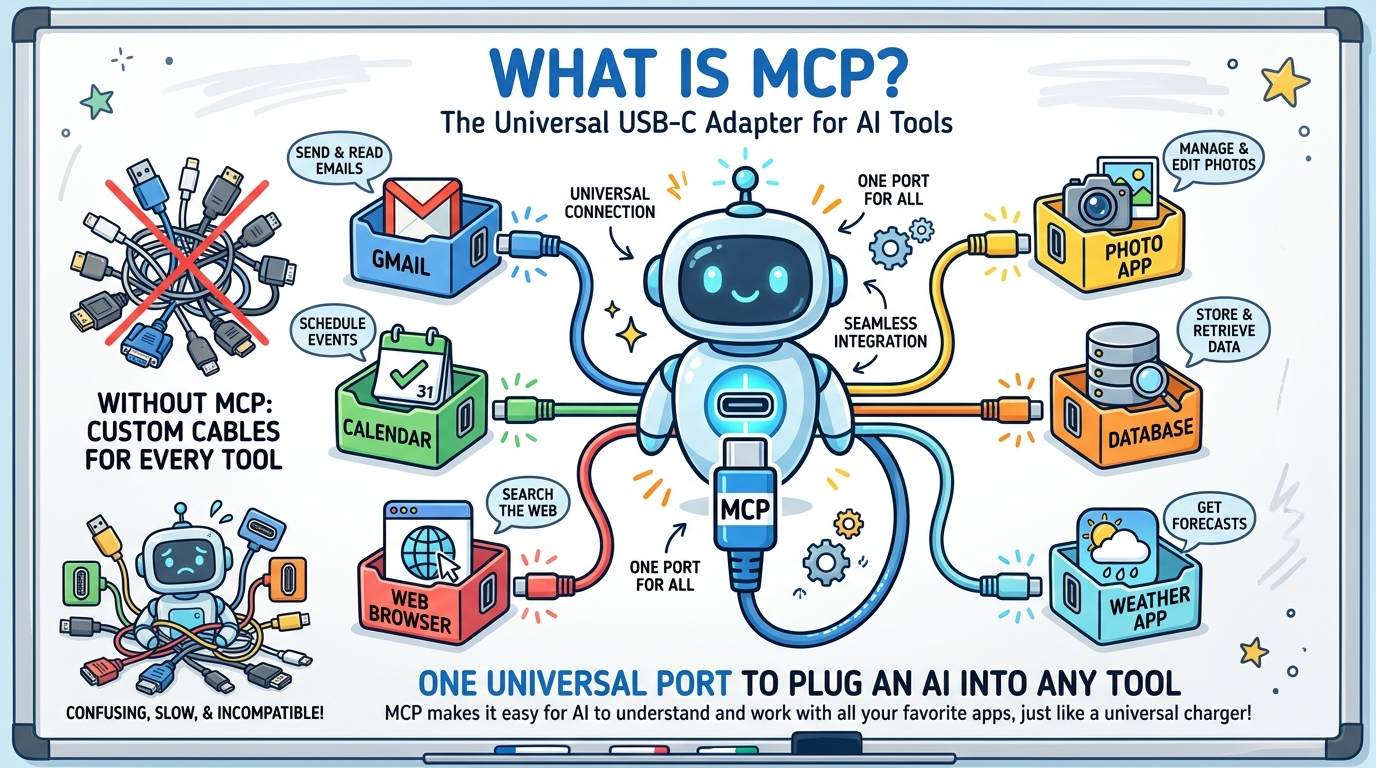
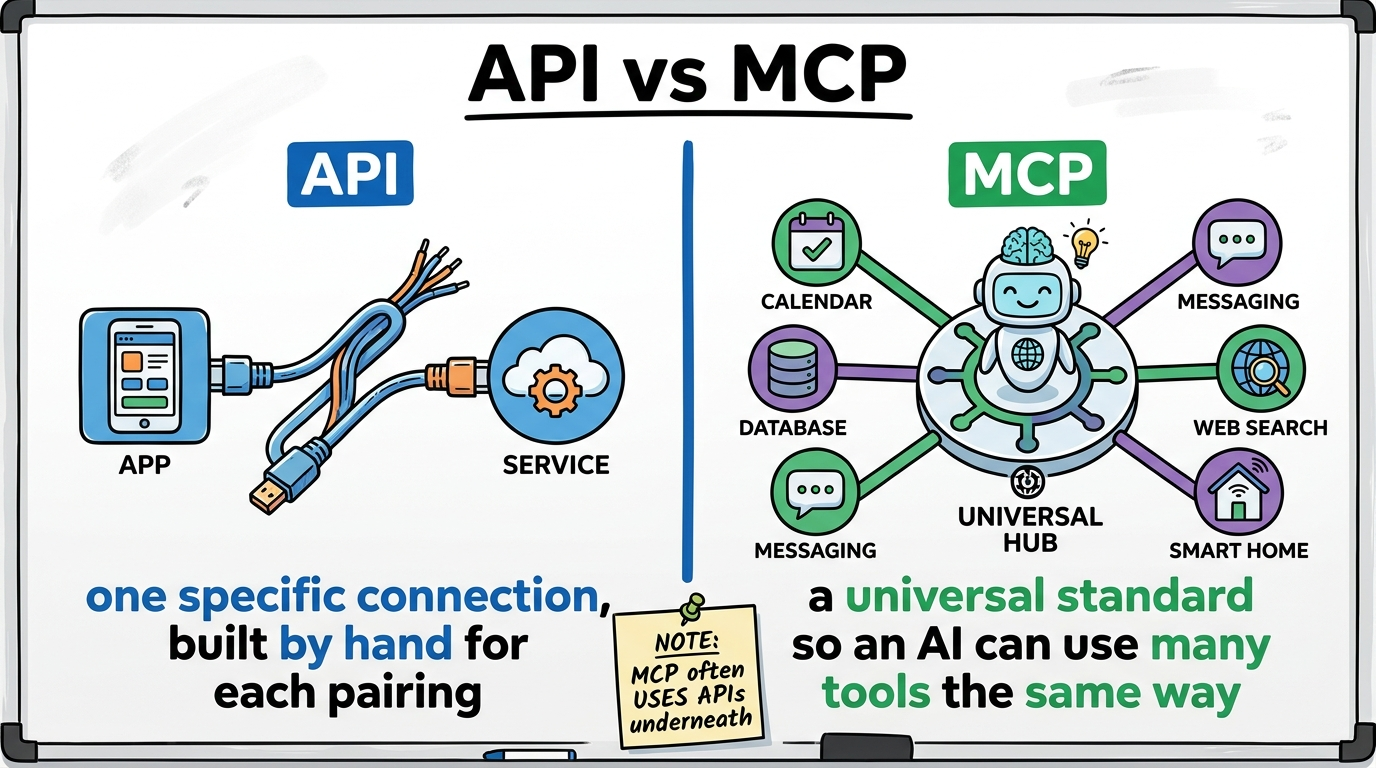
Theory: MCP is a universal standard that lets an AI connect to tools, apps, and data — all in the same way. Instead of a custom connection per tool, MCP gives every tool one shared plug shape.
The analogy — USB-C
Remember when every phone had a different charger? Then USB-C arrived — one plug for laptop, phone, headphones, monitor. Before MCP, every AI-to-tool link was a custom cable (Gmail? build one. Calendar? build another). With MCP, tools expose themselves through one standard port, so any MCP-speaking AI plugs in instantly. Build it once, works everywhere.
API vs MCP
They're not rivals — MCP usually uses APIs underneath. But they solve different problems.
| API | MCP | |
|---|---|---|
| What it is | A messenger between two specific programs | A universal standard connecting AIs to many tools |
| Analogy | A waiter for one restaurant | USB-C — one plug for everything |
| Built for | Software talking to software | AI models talking to tools |
| Effort | Custom-built for each pairing | Build once, works with any MCP AI |
| Who "speaks" it | Developers writing code | The AI model itself, on the fly |
A Use Case You'll Actually Relate To
It's Sunday night. You have a bio test Thursday, an English essay due Wednesday, soccer practice Tuesday and Thursday, and your notes are a mess of half-finished Google Docs. You're not lazy — you're overwhelmed. What if you had a teammate who just... handled the plan?
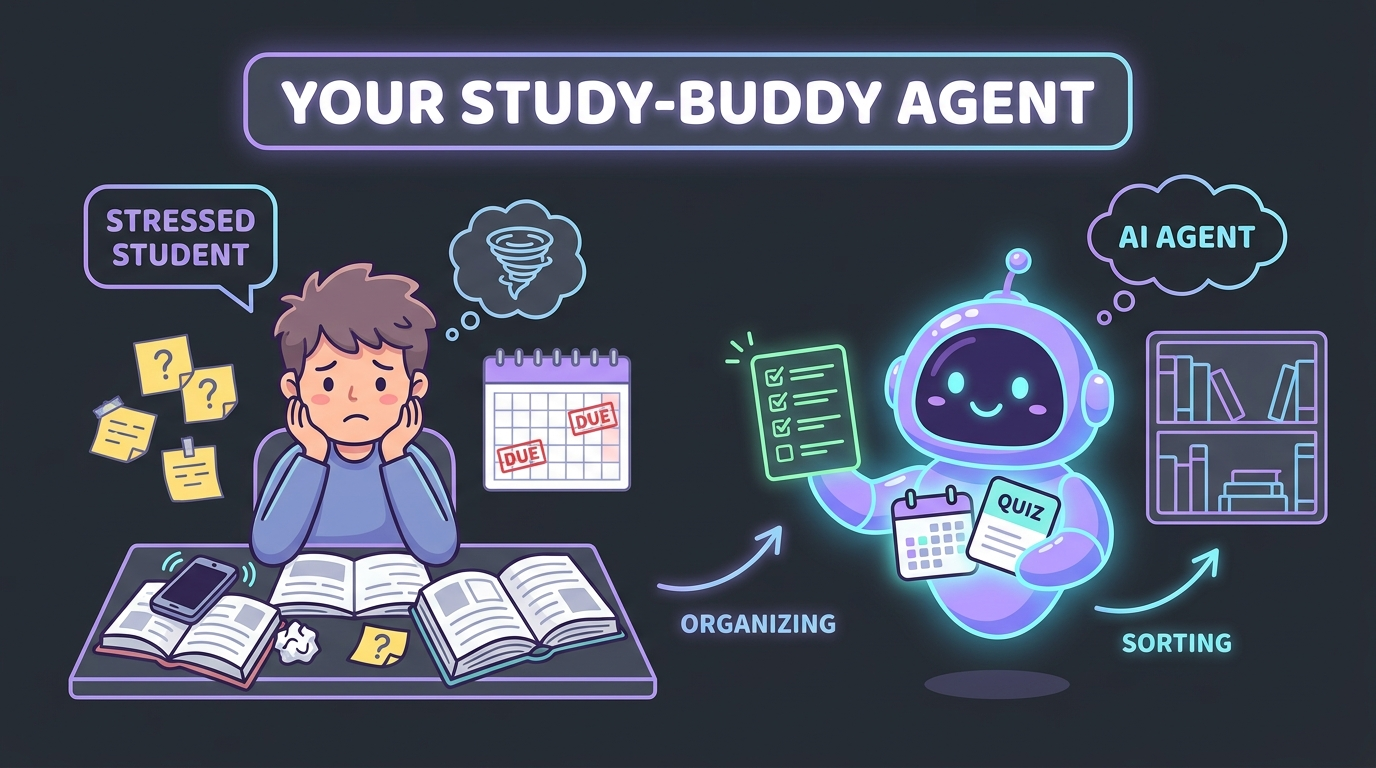
Say you tell it one thing:
Watch the agentic loop (the same Think → Act → Check → Repeat from the top) kick in:
Notice what's happening: it uses tools (your notes, your calendar, a quiz maker) — reaching each one through an API or an MCP connector, exactly like the earlier sections. That combination — a goal + a loop + real tools — is agentic AI. And it's completely buildable by a beginner.
🚀 Ideas you could build — for you or your community
Each is just "a goal + a loop + a couple of tools." Start tiny. The best ones solve a real problem for real people.
1. Study-Sprint Coach
Paste your notes; it quizzes you, tracks which topics you keep missing, and drills your weak spots harder before a test.
2. Club / Event Planner
"Organize the anime club movie night." It finds a date everyone's free, makes a flyer, messages members, and books the room.
3. College-App Wrangler
Tracks every school's deadline, checks what each one requires, drafts essay outlines, and nags you about what's left.
4. Money & Shifts Tracker
Logs your part-time shifts and allowance, sorts your spending, and tells you if you can actually afford those concert tickets.
5. Language Practice Partner
Chats with you in Spanish at your level, gently fixes mistakes, and remembers the words you keep forgetting to review later.
6. Bonus: Practice Buddy
Builds a workout or drill plan, adjusts it based on how your last session went, and logs your progress over the season.
7. Homework Helper
Tutors younger kids at your school — asks what they're stuck on, explains it simply, and quizzes them until it clicks.
8. Family Translator
Turns school notices into a family's home language and answers their questions, so language is never a barrier.
9. Volunteer Scheduler
Keeps a food bank or club's shifts filled — tracks who signed up, messages gaps, and reminds people before their slot.
From Stage 0 to Launch: "The Group-Project Rescuer"
Let's take one idea from a shower-thought to a thing that actually runs. The scenario: a 4-person history project, due Friday, and — surprise — nobody knows who's doing what. We'll build an agent that keeps the group on track.
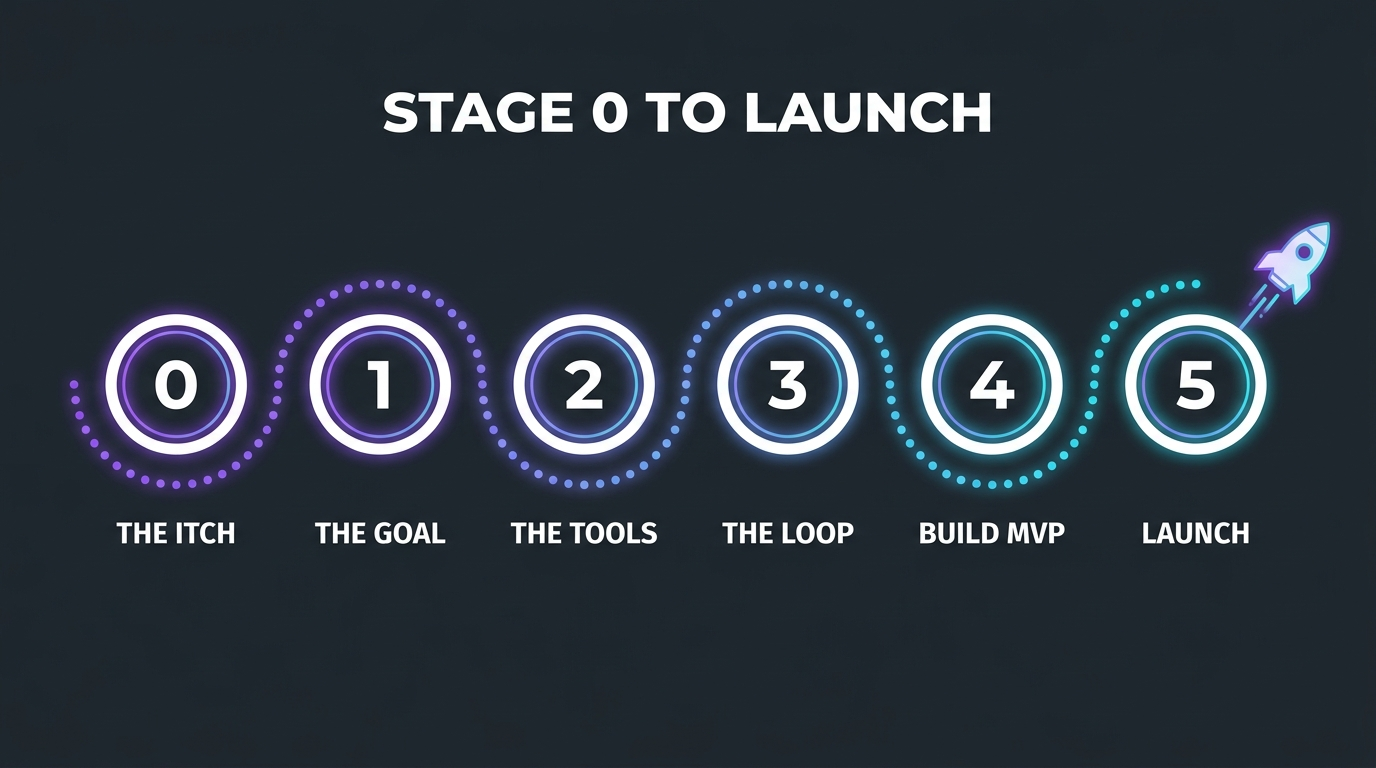
Notice a real, annoying problem
Every good build starts with a genuine "ugh, I wish something just handled this." Ours: group projects fall apart because no one tracks who's doing what, and you find out it's all undone the night before. Rule: pick a problem you personally have — you'll know if it's working.
Write it as ONE sentence
If you can't say it in a sentence, it's too big. Ours:
List what it needs to touch the real world
An agent's "brain" can only think — tools are its hands. For each thing it must do, name a tool (and remember: it reaches these through APIs / MCP, exactly like the earlier sections).
• A task list — to store who does what → a simple spreadsheet or text file
• A clock/calendar — to know how many days are left → a date tool
• A messenger — to nudge people → a Discord or email API
Design the Think → Act → Check cycle
This is the heart. Write it in plain English before any code:
Pick your parts (in plain English)
• The brain — an AI model (e.g. Claude) that decides what to say
• The hands — MCP connectors to Discord + a Google Sheet (so you don't hand-code each integration)
• A place to run — your laptop is fine to start; later, a free cloud scheduler so it runs every morning on its own
Make the smallest version that works
Don't build all of it. Build one tool + one loop. Version 1 = just read the task list and message whoever's behind. Here's the whole thing as readable pseudo-code:
# --- The Group-Project Rescuer (MVP) ---
tasks = read_sheet("project_tasks")      # the TOOL: a spreadsheet
days_left = deadline("Friday") - today()

for person in tasks:
    if person.status != "done":
        # THINK: ask the AI to write a friendly nudge
        msg = ai("Write a 1-line nudge to " + person.name +
                 ". Their part '" + person.task +
                 "' is due in " + days_left + " days.")
        send_discord(person.name, msg)   # ACT: the messenger TOOL

if count_unfinished(tasks) > 2 and days_left <= 2:
    send_discord("YOU", "⚠️ Heads up: 3 tasks still open, 2 days left!")  # CHECK + alert
That's ~10 lines and it already does something real. Ship this first.
Test it, then let it loop
Run it once by hand and read what it does — did it message the right people? Good. Now schedule it to run every morning at 8am (a free scheduler does this). Congrats: it's now an autonomous agent working while you sleep.
Add one improvement at a time
Only after v1 works: let it read replies and auto-update the sheet · draft the actual project outline · celebrate when someone finishes · handle multiple projects. Each upgrade = one more tool, one more line in the loop. That's the whole game.
Set One Up & Watch It Work
No coding required to start. Three tiers, easiest first.
🥇 Easiest — watch an agent + MCP right now (0 setup)
Open any modern AI assistant (like Claude) and ask:
"Search the web for today's top science headline,
 then make me an image about it."
Watch it think (plan) → call a web tool via MCP → call an image tool via MCP → hand you the result. That chain — goal → tools → result — is an agent using MCP. You just watched it. 🎉
🥈 Beginner build — add your first MCP connector (~10 min, no code)
- Open Claude Desktop → Settings → Connectors.
- Click Add and pick a ready-made one (web-search or filesystem).
- Ask: “List the files in my Documents folder.”
- What you're seeing: Claude just made an MCP connection and used a tool. That's the whole magic, hands-on.
🥉 See a raw API call with your own eyes (~5 min, no code)
- Paste this into your browser:
https://official-joke-api.appspot.com/random_joke - Hit Enter. The raw JSON response appears — that's exactly what an app receives from an API call.
- Refresh a few times — each refresh is a new API call returning new data.
🏆 Build a tiny agent (~20 min, a little Python)
The classic starter is a tool-using loop: a script that takes a goal, lets the AI pick a tool, runs it, feeds the result back, and repeats — printing its Think → Act → Check steps so you can literally watch it reason.
📌 Recap in one breath
- Agentic AI — give it a goal; it plans, uses tools, and checks itself in a loop.
- API call — a waiter carrying a request/response between two programs.
- MCP — USB-C for AI: one universal way to plug an AI into many tools.
- API vs MCP — a specific door vs. a universal door frame (MCP often uses APIs behind the scenes).
- Responsible AI — you're the human in charge: verify, protect data, and ask "should I?"